Turn on suggestions
Auto-suggest helps you quickly narrow down your search results by suggesting possible matches as you type.
- Sinch Community
- Numbers
- Virtual Numbers
- Buying a number from Sinch
Options
- Subscribe to RSS Feed
- Mark as New
- Mark as Read
- Bookmark
- Subscribe
- Printer Friendly Page
- Report Inappropriate Content
To send or receive SMS messages with Sinch, you will need a virtual number from Sinch. A virtual number is a standard telephone number that is not locked down to a specific phoneline. It can route a voice call, text message or fax message to any phone or application workflow.
Sinch provides a complete range of carefully-tested phone numbers for most countries, to use with all your communication services from Sinch. You can get numbers that are set up for SMS, Voice, Fax or a combination of these. You can buy a number from any country where Sinch has numbers in inventory. Countries with numbers available for rental are marked with Direct Access. All other countries will require you to submit a request to Sinch for manual handling.
Note: When you get a virtual number supporting documentation may be required and will need to be submitted before the transaction can be completed. If this is the case a message will be displayed at the bottom of your form (in an orange box). Learn more about supporting documentation.
To search for and rent virtual numbers:
- Log in to the Sinch Build Dashboard.
- Select Numbers from the left menu and select the Get virtual numbers option. The Get virtual numbers page is displayed:
This page allows you to search for the type of number you require using the following criteria:
Country Enter the country you require a number for. Number If you are looking for a particular number, type in some of the digits you require in the Number. Type Select the type of number you require. Feature Select the features for the number you require.

- If you are purchasing numbers in Sweden or Australia, click Order numbers and follow these instructions. Otherwise select the desired country and click Search.
- If you don't want to specify any details about the number, simply choose your country and click Search.
- A list of available numbers to buy are displayed:
- To rent a number, click Buy next to the number you want to buy. The number details dialog is displayed:
This dialog displays the details of the number you want to purchase, setup information, the associated terms of use and fees, and some additional fields (dependent on the type of number you selected).


-
As an option for 10DLC numbers in the USA and Canada, you can also specify the campaign that you would like to configure the number on.
Note: This step is optional and you can specify the campaign later by selecting the Your virtual numbers option from the Numbers left hand menu. -
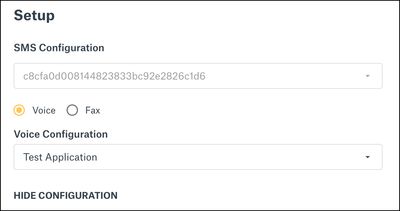
If you click SHOW CONFIGURATION in the Setup section you can view details of the SMS and/or Voice configuration(s) for this number, which are automatically filled in:
-
However, if you have multiple configurations, then you will need to select the correct SMS and/or Voice, Fax configurations from the corresponding drop-down fields.
Click GET NUMBER to purchase the number.
Note: You need to ensure you have sufficient funds to purchase the number and pay any associated setup fees.
The details of the number you have purchased will be displayed in Your virtual numbers:
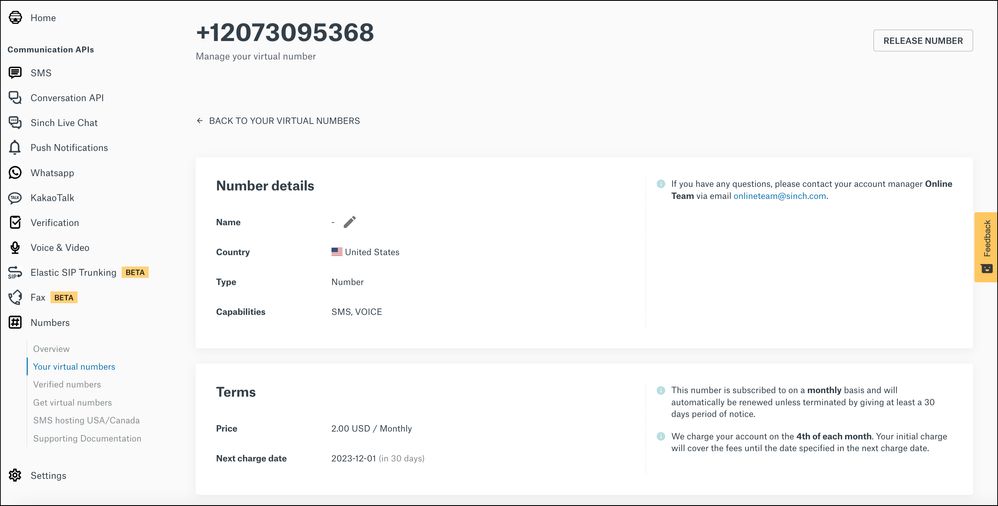
You can configure your number with an SMS, Voice or Campaign ID (only for 10DLC numbers) when you activate the number. Learn more about 10DLC Numbers.
When you get a virtual number, supporting documentation may be required and will need to be submitted before the transaction can be completed. If this is the case a message will be displayed at the bottom of your form (in an orange box). Learn more about supporting documentation.
Ordering numbers
In certain countries, the number ordering process has been streamlined. In those countries, you can order batches of numbers (up to 100).
- When you click Order numbers, the Order Numbers dialog is displayed.
- In the dialog you can enter your desired amount of numbers to purchase, configure any SMS or Voice settings, and depending on the country, look to see what kind of information is required to purchase the numbers. When finished, click Continue.
- A review screen is displayed, showing the quantity of numbers you've chosen and the total cost.
On this screen, depending on the country in which you are purchasing numbers, fill out any required information. Then click Submit and pay to purchase your numbers.


Click here to learn more about how you can get access to a complete range of carefully-tested phone numbers, to use with all your communication services from Sinch.
Options
- Mark as New
- Bookmark
- Subscribe
- Mute
- Subscribe to RSS Feed
- Permalink
- Report Inappropriate Content
Featured Article

 Shahzad_Ismail
Community Manager
To send or receive SMS messages with Sinch, you will need a virtual number from Sinch. A virtual number is a standard telephone number that is not locked down to a specific phoneline. It can route a voice call, text message or fax message to any phone or application workflow.
Sinch provides a complete range of carefully-tested phone numbers for most countries, to use with all your communication services from Sinch. You can get numbers that are set up for SMS, Voice, Fax or a combination of these. You can buy a number from any country where Sinch has numbers in inventory. Countries with numbers available for rental are marked with Direct Access. All other countries will require you to submit a request to Sinch for manual handling.
Note: When you get a virtual number supporting documentation may be required and will need to be submitted before the transaction can be completed. If this is the case a message will be displayed at the bottom of your form (in an orange box). Learn more about supporting documentation.
To search for and rent virtual numbers:
- Log in to the Sinch Build Dashboard.
- Select Numbers from the left menu and select the Get virtual numbers option. The Get virtual numbers page is displayed:
This page allows you to search for the type of number you require using the following criteria:
Country Enter the country you require a number for. Number If you are looking for a particular number, type in some of the digits you require in the Number. Type Select the type of number you require. Feature Select the features for the number you require.
- If you are purchasing numbers in Sweden or Australia, click Order numbers and follow these instructions. Otherwise select the desired country and click Search.
- If you don't want to specify any details about the number, simply choose your country and click Search.
- A list of available numbers to buy are displayed:
- To rent a number, click Buy next to the number you want to buy. The number details dialog is displayed:
This dialog displays the details of the number you want to purchase, setup information, the associated terms of use and fees, and some additional fields (dependent on the type of number you selected).
-
As an option for 10DLC numbers in the USA and Canada, you can also specify the campaign that you would like to configure the number on.
Note: This step is optional and you can specify the campaign later by selecting the Your virtual numbers option from the Numbers left hand menu. -
If you click SHOW CONFIGURATION in the Setup section you can view details of the SMS and/or Voice configuration(s) for this number, which are automatically filled in:
-
However, if you have multiple configurations, then you will need to select the correct SMS and/or Voice, Fax configurations from the corresponding drop-down fields.
Click GET NUMBER to purchase the number.
Note: You need to ensure you have sufficient funds to purchase the number and pay any associated setup fees.
The details of the number you have purchased will be displayed in Your virtual numbers:
You can configure your number with an SMS, Voice or Campaign ID (only for 10DLC numbers) when you activate the number. Learn more about 10DLC Numbers.
When you get a virtual number, supporting documentation may be required and will need to be submitted before the transaction can be completed. If this is the case a message will be displayed at the bottom of your form (in an orange box). Learn more about supporting documentation.
Ordering numbers
In certain countries, the number ordering process has been streamlined. In those countries, you can order batches of numbers (up to 100).
- When you click Order numbers, the Order Numbers dialog is displayed.
- In the dialog you can enter your desired amount of numbers to purchase, configure any SMS or Voice settings, and depending on the country, look to see what kind of information is required to purchase the numbers. When finished, click Continue.
- A review screen is displayed, showing the quantity of numbers you've chosen and the total cost.
On this screen, depending on the country in which you are purchasing numbers, fill out any required information. Then click Submit and pay to purchase your numbers.
Click here to learn more about how you can get access to a complete range of carefully-tested phone numbers, to use with all your communication services from Sinch.
