Browse
Developers
Partners
Operators
Service Status
Contact Support
sinch.com
Sinch Community
Developers
Partners
Operators
Service Status
Contact Support
sinch.com
Community sign in
All community
Knowledge base
Users
Products
cancel
Turn on suggestions
Auto-suggest helps you quickly narrow down your search results by suggesting possible matches as you type.
Showing results for
Show
only
|
Search instead for
Did you mean:
Sinch Community
Moderator Forums (Private for Community team)
Archived Boards (Private)
Contact
How do I pick a conversation to respond to?
Options
Subscribe to RSS Feed
Mark as New
Mark as Read
Bookmark
Subscribe
Printer Friendly Page
Report Inappropriate Content
How do I pick a conversation to respond to?
You have two options:
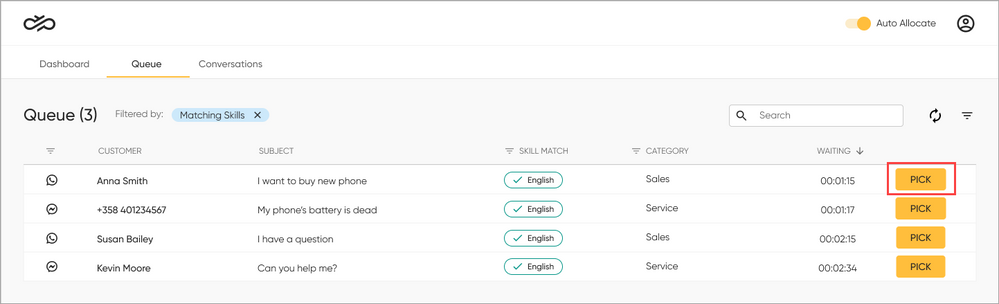
To pick conversations yourself, move to the
Queue
tab and click
Pick
.
Read more about the Queue tab
.
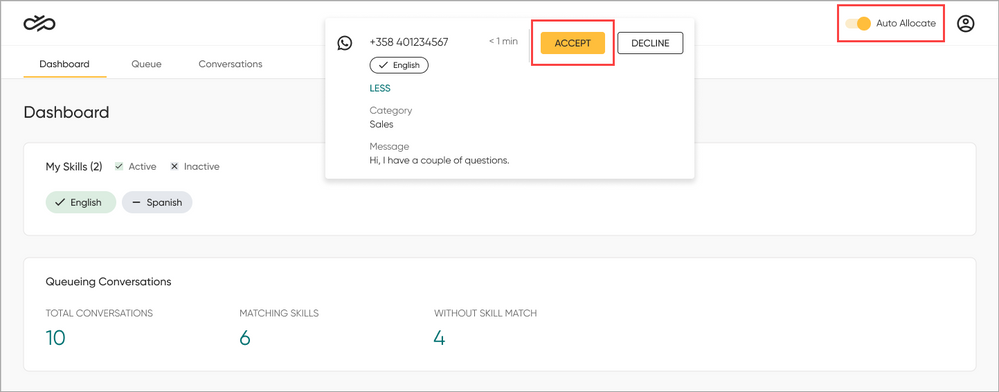
To be offered conversations automatically, turn on
Auto Allocate
. You will get a notification when a conversation is offered to you. Click
Accept
.
Read more about automatic allocation
.
Now you have picked a conversation. Next,
say hello to your customer
.
Labels:
Agent
Contact Beta
How To
Workspace
Ask a question
Version history
Last update:
02-17-2022
12:21 AM
Updated by:
Niina_P