Turn on suggestions
Auto-suggest helps you quickly narrow down your search results by suggesting possible matches as you type.
- Sinch Community
- More topics
- Voyant
- Atlas Partner Portal
- nCommand Plus Downloads
Options
- Subscribe to RSS Feed
- Mark as New
- Mark as Read
- Bookmark
- Subscribe
- Printer Friendly Page
- Report Inappropriate Content
Directions to ncommandapp.com
The ncommandapp.com site is a microsite used to generically host information about the nCommand Plus applications for your customers to use.
You can find updated information, download links, and help for Command Plus at ncommandapp.com:
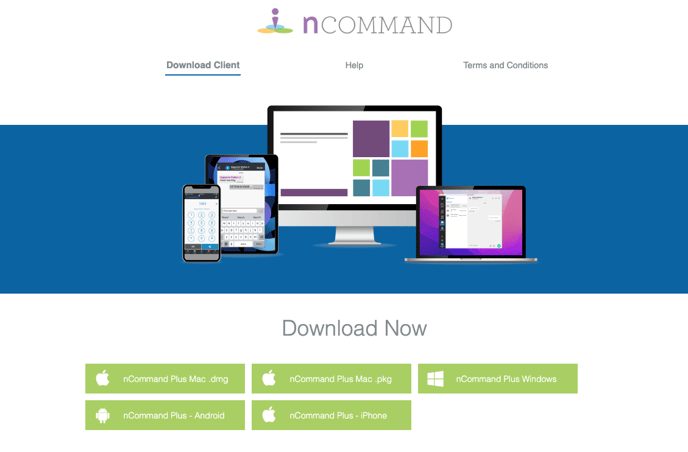
Download nCommand Plus desktop apps:
Here is where you can download all the desktop application variations if you would like to host these for your customers yourself. The mobile apps will only be downloadable from the app stores.
NOTE: nCommand Plus desktop for Windows is supported on Windows 11 and above and macOS 13 and above.
New 3.0 updates - Sept 3, 2026 client builds available below for downloading
nCommand Plus for Windows - exe installer
nCommand Plus for Windows - msi installer
nCommand Plus for macOS - Apple chip installer
nCommand Plus for macOS - Intel chip installer
Updates for 3.0
The client contains a number of new features including the following:
-
A new Quick Dial feature. This lets you create shortcuts to your most frequently called contacts. BLFs that you create in the Customer Portal will also show here, making it much easier to see those users. On the mobile clients, the users in your Quick Dial list will show in a new tab. On the desktop clients, the Quick Dial list will show on the main Dialpad display.
-
Integrated call logs. The call history now shows all calls from your user seat, along with missed calls and access to visual voicemail all in one place.
-
Do Not Disturb on the main screen. Do Not Disturb is back. Pressing this button will put your user seat in Do Not Disturb. This affects all devices you may have on your seat. Press it again to undo Do Not Disturb.
-
Google directory integration. Just like with O365, you can now integrate your Google contacts.
-
Refreshed theme in the desktop version. New icons, muted colors, and other updates.
-
Numerous fixes and improvements throughout.
NOTE: The 2.7 client will pick up many of the configuration changes above and including the theme update, call log changes and others. Upgrade to the 3.0 client for the best experience.
2.7 updates - July 29, 2025 client builds
nCommand Plus for Windows - exe installer
nCommand Plus for Windows - msi installer
nCommand Plus for macOS - Apple chip installer
nCommand Plus for macOS - Intel chip installer
nCommand Plus for macOS - Apple chip pkg installer
nCommand Plus for macOS - Intel chip pkg installer
Updates for 2.7
- The client now supports a Logout option that will retain call records and other data. Logout will be available in the Settings page of the apps. Logging out will retain all user data including call history, etc.
- The DND button is removed from the main screen and is available in the Call Control tab. The "Local DND" option is no longer necessary with the introduction of logout.
- The desktop client now supports Busy Lamp Fields (BLFs) in the same way that the mobile client does within the Enterprise contacts.
- If your account gets locked out, the client will automatically logout. You will need to reset your password before being able to log in again.
- Minimum iOS version is now 16.
Fixes
- Fixes to messaging to improve how quickly messages are displayed in the desktop and mobile clients.
- Various other fixes and improvements.
Labels:

Options
- Mark as New
- Bookmark
- Subscribe
- Mute
- Subscribe to RSS Feed
- Permalink
- Report Inappropriate Content
