A Business Profile, part of the Compliance Center, requires verification once its created. This process includes more in depth company information to verify that the business and the messaging traffic they will be sending is legitimate. This stage of the Business Profile creation allows for a brand to confirm the US messaging product that they would like to start using (10DLC, Short Code, or RCS), and finalize verifying their brand with Sinch all in one quick form.
Once verified, this brand is able to be utilized again and again with different US messaging products at any time, saving you from re-entering the same information for future US messaging products.
This step by step guide walks you through verifying your business profile, allowing you to choose which product you want to get started with: 10DLC, Short Code, or RCS.
To verify a business profile, take the following steps:
- Log in to the Sinch Build Dashboard.
- Select the Profiles option from the COMPLIANCE CENTER -> Business profiles menu in the left panel. The Business profiles page is displayed:

Select the Business Profile you want to verify, in this case "Test Brand".
- The Business Profile page for Test Brand is displayed:

Click Verify your business.
- The Select number or sender type step is displayed which shows you the three available number/sender types: Short Code, Long Number or RCS. Depending on which of these options you select - additional options related to that number/sender type are displayed. For example, if you select Short Code:
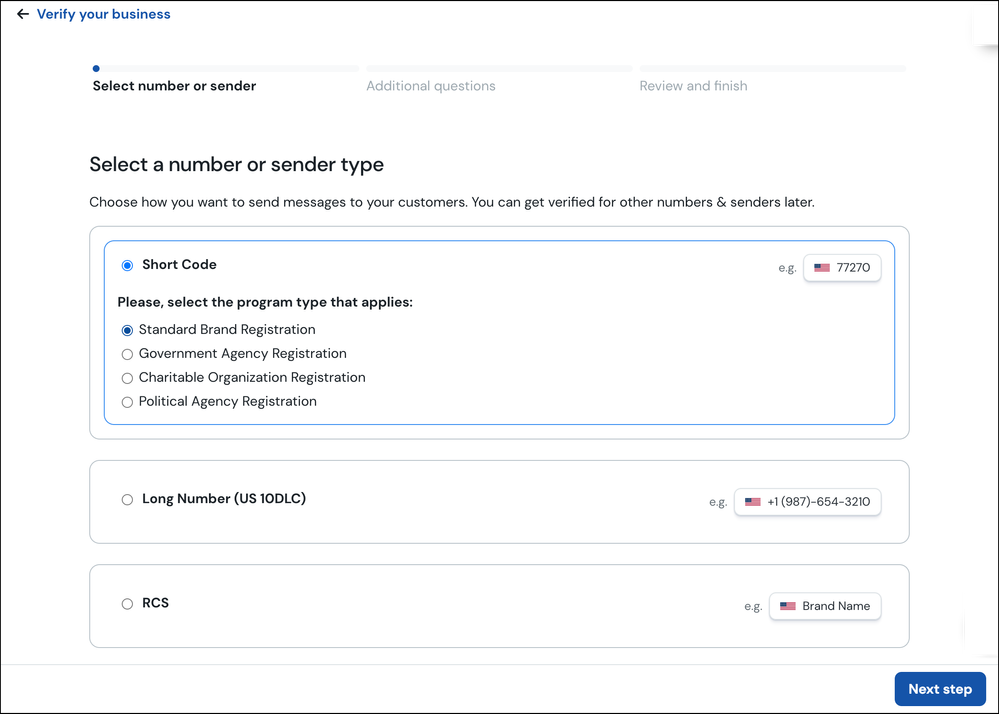
Select the number/sender type you want to use to send messages. Click Next step.
- The Additional questions step is displayed:

The information requested on this form depends on the number/sender type selected in step 4. Enter the information requested on this form. Click Next step.
- The Review & submit step is displayed. This shows you a summary of the information entered and any associated fees. If all the information is accurate, click Submit.

